Safeway Deals & Delivery
Albertsons Companies, Inc.Shopping
4.753.13K Reviews
- Version
- 2026.39.0
- Installs
- 10.00M
- Age Rating
- Everyone
Screenshots
Our Review of Safeway Deals & Delivery
 Analysis by Appyee
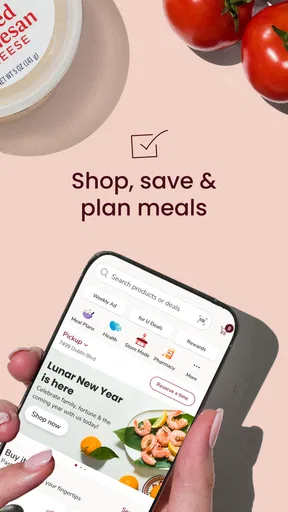
I use Safeway Deals & Delivery as a practical shopping companion rather than treating it as a replacement for the entire grocery trip. Its main appeal is bringing several errands into one place: browsing groceries, finding digital deals, arranging pickup or delivery, locating fuel, and handling prescription refills. That combination makes sense for a busy household, although the experience is most useful when you already shop at Safeway and are willing to check the details before placing an order.
Safeway Deals & Delivery is a free shopping app from Albertsons Companies, Inc. It is rated for Everyone, runs on Android devices using version 8.0 or later, and the current release is 2026.27.0. Its scale is also reassuring: the app has passed 10 million installs, with an average rating of 4.7 from roughly 445 thousand ratings. Those figures do not guarantee a perfect experience, but they suggest that the app is established rather than experimental.
How Safeway fits into an ordinary shopping routine
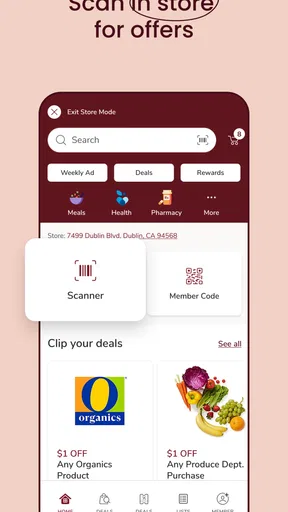
My first impression is that the app works best when I begin with a plan. Instead of opening it only when I am already standing in a store, I can use it before shopping to look through available groceries, identify deals, clip relevant coupons, and decide whether pickup or delivery makes more sense. That preparation is important because the app combines shopping tools with account-based savings, so a few minutes of setup can affect the final order more than simply searching for products.
The most useful way to think about it is as a bridge between Safeway’s physical stores and its online ordering service. A person who prefers walking the aisles can still use the app for coupons, fuel information, and prescription tasks. Someone who dislikes store visits can focus on grocery delivery or pickup. The app does not force one style of shopping, which is a genuine strength for households whose routines change from week to week.
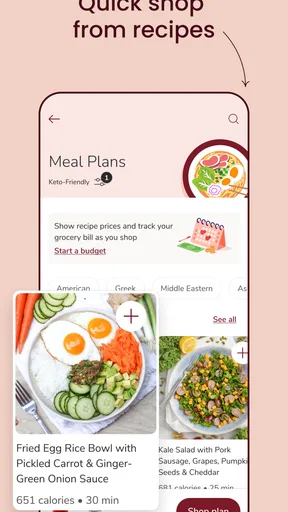
A realistic example would be a Sunday evening grocery run. I could search for the staples I need, clip the offers that apply to my account, choose pickup for a busy Monday, and then use the app later in the week to check a nearby fuel location. If a prescription needs attention, the same app can also be part of that errand. The benefit is not one spectacular feature; it is avoiding several separate errands and scattered store tools.
Deals are useful only when I manage them deliberately
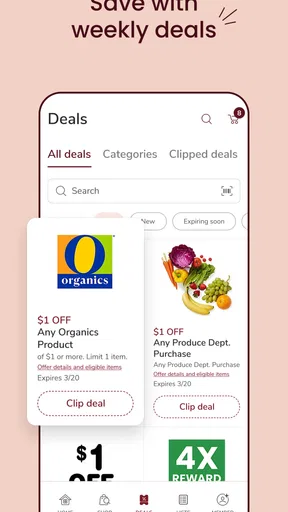
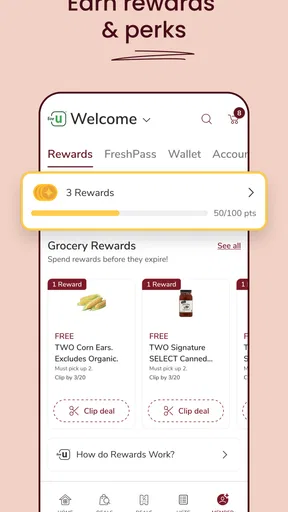
The coupon area deserves more attention than a quick glance. Digital deals can be easy to overlook if I add products to a basket first and think about savings afterward. I prefer to browse offers before finalizing my list, then check that the selected products actually match the wording of the deal. This is a small habit, but it reduces the disappointment of assuming a discount applies when the item, size, or purchase condition is different.
That workflow also changes how I compare products. A lower shelf price is not automatically the better choice if a digital offer makes another qualifying item more attractive. At the same time, I would not buy something unnecessary merely because it appears in the deals section. The app can help me spend less on planned purchases, but it can also encourage extra browsing. My advice is to start from a shopping list and use the offers to refine it, not to let the offers create the entire list.
There is another practical trade-off: digital savings are convenient, but they depend on remembering to use the same account during checkout. That is less effortless than picking up a paper coupon or seeing a shelf label in the store. For regular Safeway customers, the habit becomes manageable. For occasional shoppers, the extra checking may cancel out part of the convenience.
Pickup and delivery serve different kinds of convenience
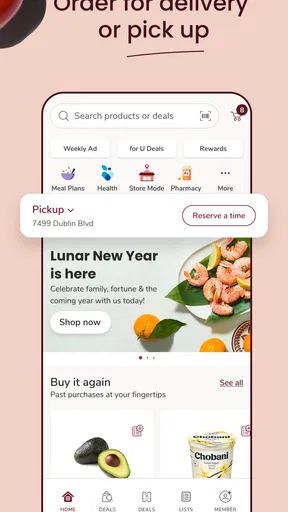
Ordering groceries through the app is more than a matter of tapping products into a basket. The real decision is whether I want control over the timing or control over the selection. Pickup can suit someone who wants to avoid walking through the store but still collect the order at a chosen time. Delivery is more helpful when travel, mobility, weather, or a packed schedule makes visiting the store difficult.
I would choose pickup for a planned weekly shop when I can work around the collection window. I would lean toward delivery for bulky groceries, a last-minute household need, or a day when leaving home is inconvenient. Neither option removes the need to review the order carefully. Substitutions, unavailable products, and the difference between what I imagined ordering and what is actually listed can affect satisfaction, so I would inspect the basket before submitting it rather than rushing through checkout.
This is where the app compares favorably with a basic store website or a general grocery marketplace: it connects the order to Safeway’s own shopping environment, deals, and store-related services. However, a broad delivery marketplace may be better for someone who wants to compare several supermarkets in one screen. Safeway’s focused approach is an advantage for loyalty and simplicity, but a limitation for cross-store price comparison.
Fuel and prescriptions make it more than a grocery basket
The fuel-finding feature is easy to underestimate. It is valuable when I am already planning a shopping trip and want to combine errands, especially if I need to know where a nearby Safeway fuel location is before driving across town. I would not treat it as a complete fuel-price research tool without checking the information shown at the time, but it is a convenient starting point for locating the relevant service.
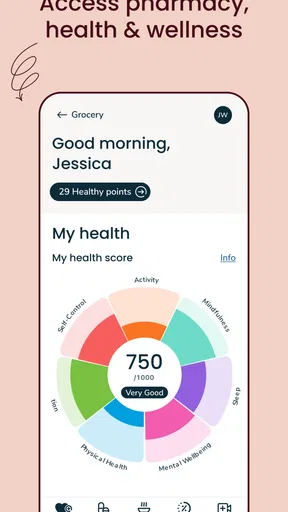
Prescription refills add another useful layer. For someone who already uses Safeway for groceries and pharmacy needs, having refill tasks alongside shopping can reduce the number of apps and reminders involved in a normal week. The practical advantage is organizational rather than dramatic: I can think about groceries, fuel, and a refill as connected errands instead of separate chores.
Still, I would keep expectations realistic. A pharmacy task can be more sensitive to timing and accuracy than adding cereal or vegetables to a cart. I would review the medication and refill information carefully before submitting anything, and I would not assume that a grocery-ordering app removes the need to follow pharmacy instructions. The feature is convenient, but it deserves the same attention I would give any health-related task.
What the free price really means
Access to Safeway Deals & Delivery is free, which makes trying it low risk. I can install it without paying for the app itself and decide whether its shopping tools fit my routine. That is the clearest verified value: the digital doorway to deals, ordering, fuel finding, and prescription refills does not require an upfront app purchase.
Free access should not be confused with every shopping choice being free. Groceries, delivery or pickup arrangements, and any other transaction-related costs belong to the order rather than the app’s download price. Since those amounts can depend on the specific purchase and service selected, I would inspect the final checkout screen instead of assuming that using the app makes the whole transaction cheaper.
This distinction matters when comparing Safeway with other grocery apps. A paid app would need to justify its purchase price before I even used it; Safeway does not create that barrier. Its value comes from whether I save time, use relevant deals, and choose a shopping method that fits my day. If I rarely shop at Safeway, free installation alone may not create much value.
Where the experience can become frustrating
The biggest weakness is the amount of attention required. A grocery app can look simple while still asking me to manage account details, offers, products, fulfillment choices, and the final basket. If I expect every discount to apply automatically or every item to be available exactly as shown, I may find the process more tiring than walking into the store with a short list.
Online grocery selection also changes the way I judge freshness and substitutions. In a physical store, I can choose the ripest produce, compare package sizes, and immediately replace an unavailable brand. In the app, I am making those decisions through product listings and order options. That is convenient for predictable packaged goods, but less satisfying when I care about selecting individual items myself.
Delivery is similarly convenient but less direct than carrying groceries home. I would use it when time or mobility matters more than complete control. If I am already near a Safeway and need only a few items, shopping in person may be faster. If I want the lowest possible total and enjoy comparing every shelf option, the app may not be the best tool either, because convenience can encourage a less deliberate purchase.
Another limitation is focus. Safeway Deals & Delivery is excellent for a Safeway-centered routine, but it is not the natural choice for a shopper who rotates between many supermarket chains. A general grocery comparison service may provide a wider view, while a store-specific app can provide deeper access to that one retailer’s deals and services. I would choose based on loyalty and local availability rather than assuming one model is universally better.
Small habits that improve the result
I recommend creating the list before exploring the deal section. This prevents the most visible promotions from steering the entire shop and makes it easier to identify which discounts genuinely help. After that, I would review the basket once for quantities and again for fulfillment details. Separating those checks makes it less likely that I miss an unwanted item or overlook an important pickup or delivery choice.
For a recurring household shop, I would also group items mentally by urgency. Pantry staples can go into a scheduled order, while products I want to inspect personally can remain part of an in-store visit. This mixed approach is one of the app’s strongest practical possibilities: I do not have to choose between using digital ordering and shopping physically every time.
When using fuel finding, I would plan it alongside another trip rather than making a special drive only for that feature. The convenience becomes more meaningful when it reduces a separate errand. For prescription refills, I would start earlier than the moment I run out and verify the request before sending it. These habits are not flashy, but they are the difference between an app that merely contains useful tools and one that actually simplifies a routine.
Who will get the most value
Safeway regulars are the clearest audience. If I already shop at the chain, the app gives me a central place to manage digital deals, grocery orders, pickup or delivery, fuel locations, and prescription refills. Families can benefit from planning a larger basket in advance, while busy workers may appreciate avoiding a full store visit after a long day.
It can also suit people who want flexible shopping rather than one fixed method. I might order delivery during a hectic week, use pickup when I am driving nearby, and shop in person when I want to choose fresh food myself. That flexibility is more valuable than any single feature because it adapts to changing circumstances.
I would be less enthusiastic about recommending it to someone who shops at Safeway only occasionally, prefers several retailers, or dislikes managing digital coupons. A person who wants to browse produce personally may find online ordering restrictive, and a shopper seeking the broadest possible price comparison may prefer a multi-store service. The app is free to try, but that does not mean it is the right center for every grocery routine.
My verdict after weighing convenience against control
Safeway Deals & Delivery is worth trying if Safeway is already part of your regular shopping life. Its free access lowers the barrier, and its combination of grocery shopping, deals, pickup, delivery, fuel finding, and prescription refills gives it more everyday usefulness than a coupon-only tool. I especially like the option to mix digital ordering with in-store shopping instead of treating them as competing habits.
My recommendation comes with a clear condition: use it as a planning tool, not as an automatic money-saving machine. Start with a list, check the deal requirements, inspect the basket, and choose pickup or delivery according to the day rather than habit. That approach preserves the convenience while reducing impulse purchases and unpleasant surprises.
For a Safeway loyalist, the app can consolidate several errands and make routine shopping easier. For someone who wants retailer-neutral comparison or complete control over fresh items, another option—or a traditional store visit—may be better. I would install it because the app itself is free and the feature mix is genuinely practical, but I would judge its long-term value by how often it saves me time and helps with purchases I already intended to make.
With an age rating of Everyone and a long presence in the shopping category since its release on May 10, 2012, it feels accessible to a broad household audience. Its 52 thousand written reviews also show that many users have taken the time to describe their experiences. I would not treat popularity as a substitute for checking my local shopping conditions, but the app has enough depth to earn a place on my phone when Safeway is one of my regular stops.
Privacy and Permissions
See what permissions an app requests and how it handles your data.
- Location
- approximate location (network-based), precise location (GPS and network-based)
- Phone
- directly call phone numbers, read phone status and identity
- Photos/Media/Files
- read the contents of your USB storage, modify or delete the contents of your USB storage
- Storage
- read the contents of your USB storage, modify or delete the contents of your USB storage
- Camera
- take pictures and videos
- Microphone
- record audio
- Wi-Fi connection information
- view Wi-Fi connections
- Device ID & call information
- read phone status and identity
- Other
- view network connections, pair with Bluetooth devices, access Bluetooth settings, connect and disconnect from Wi-Fi, control flashlight, full network access, change your audio settings, run at startup, reorder running apps, control vibration, prevent device from sleeping
Verdict
Strengths of Safeway Deals & Delivery
- Digital coupons apply easily at checkout.
- Weekly deals help reduce grocery costs.
- Delivery and pickup options save shopping time.
- Personalized offers can match regular purchases.
- Shopping lists make it easier to organize trips.
Limitations of Safeway Deals & Delivery
- Some deals require a loyalty account or clipped coupon.
- Delivery fees and service charges can increase the total.
- Item availability may differ between stores and the app.
- Substitutions can be unsuitable for specific grocery needs.
- App performance may vary during busy promotional periods.
Other Releases by Albertsons Companies, Inc.
View All
Albertsons: Grocery & Deals
Shopping4.8

ACME Markets Deals & Delivery
Shopping4.8

Jewel-Osco Deals & Delivery
Shopping4.7

Vons Deals & Delivery
Lifestyle4.8
Similar Picks in This Category
View All
SHEIN-Shopping Online
Roadget Business PTE. LTD.4.8

Amazon Shopping
Amazon Mobile LLC4.4


Mercado Libre: Compras online
Mercado Libre4.8

Wish: Shop and Save
Wish US Holdings LLC4.7

Alibaba.com - B2B marketplace
Alibaba Mobile4.4
Frequently Asked Questions
What is Safeway Deals & Delivery, and what can I use it for?
Safeway Deals & Delivery is the official shopping app for Safeway customers. After signing in or creating an account, you can browse groceries and household products, search for items, view weekly specials, add digital coupons, build a shopping list, and place pickup or delivery orders where available. The exact features, product selection, and services may vary depending on your local Safeway store and delivery area.
How do Safeway digital coupons and weekly deals work in the app?
The app lets you browse available digital coupons, weekly advertisements, personalized offers, and other promotions. You generally need to sign in and connect your Safeway for U account so eligible discounts can be added to your account before checkout. At the store, enter or scan the phone number associated with your account. For online orders, applicable savings are usually reflected during checkout, subject to product, location, date, and quantity restrictions.
Can I order groceries for delivery or store pickup through Safeway Deals & Delivery?
In supported locations, the app allows you to choose between grocery delivery and pickup options, select an available time slot, and place an order without visiting the store. Pickup may be offered through designated collection areas, while delivery availability depends on your address, local inventory, operating hours, and capacity. Fees, minimum order requirements, substitutions, and service charges can differ by market, so review the final checkout summary carefully.
Does Safeway Deals & Delivery offer loyalty rewards or personalized savings?
Yes, the app is designed to connect with Safeway’s loyalty program, allowing eligible users to access digital coupons, member pricing, rewards, and personalized offers. Savings can depend on your account status, purchase history, participating products, and the store selected for the order. Some rewards or promotions may have expiration dates or exclusions. Before relying on a discount, check its individual terms in the app.
What should I know about payment, substitutions, and order changes?
Safeway Deals & Delivery typically allows customers to review their cart, choose a fulfillment method, select substitutions or replacement preferences when available, and pay through supported methods at checkout. Product availability can change before an order is prepared, and final totals may be adjusted for weighted items, substitutions, taxes, deposits, tips, or applicable fees. Carefully verify your address, contact details, delivery instructions, and order summary before submitting.
